Digitize Your World with Substance Alchemist
Substance Alchemist is fast becoming the definitive scan processing resource. It provides you with the ability to create vast collections of materials, whether working from data provided by your own photos or other images, or by modifying existing 3D resources. It grants you essentially limitless power to digitize the world.
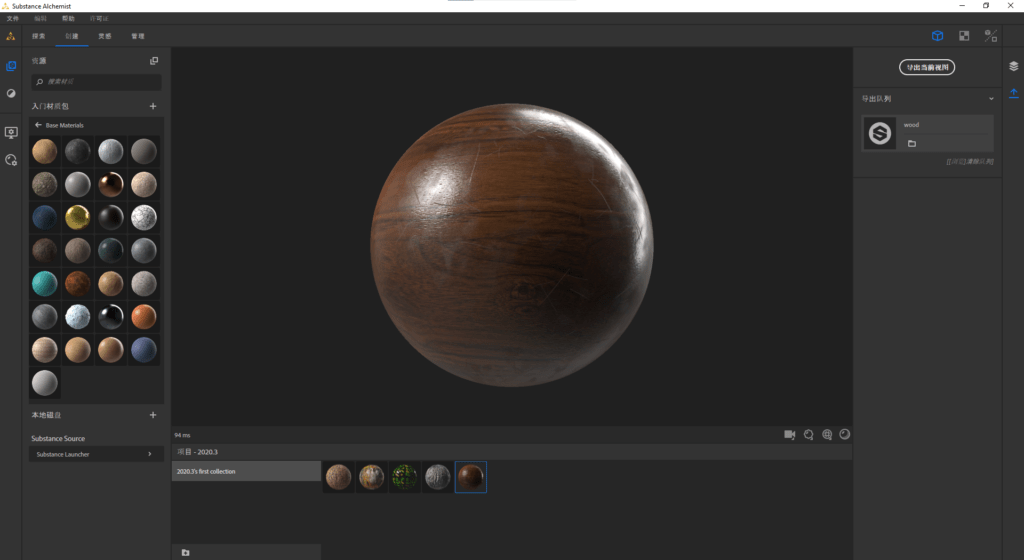
This latest release of Substance Alchemist expands that power more than ever before, providing more content, improved features, and an increase in results and efficiency overall. Here are the newest ways in which Substance Alchemist will help you scan the environment around you.
AI Comes to Your Atlases
The first thing in the scan workflow tool chest is the Image to Material with AI filter. If you haven’t encountered this yet, give it a try, because it’s mind-blowing. This AI-powered filter helps you make the most out of your photographic data, and turn it into a usable material.
For this release we reworked the parameters. Now there are a few things that the filter does a lot better — roughness generation, for instance. Starting today, you can add variation to your roughness, based on curvature. If you’re working on tree leaves — and honestly, what kind of forest doesn’t have leaves — you can easily give them some much-needed softness.
If you want a little more control over the delighter, that’s in here too, as you can change or reduce the delighting intensity of your material.
The filter is now compatible with the new NVIDIA GeForce RTX 30 Series; upgrade to the new series to leverage the increased power of these graphics cards.
Image to Material is also powered by Adobe Sensei: Substance is increasingly able to leverage the expertise of Adobe’s machine learning and AI teams in order to make Substance Alchemist a faster and more powerful tool.
And if you’ve been using Substance Alchemist to process your scanned atlases, we’re happy to announce that you can get even more out of Image to Material with AI by coupling it with the new atlas generator filter: it generates your opacity channel.
New Technical Filters: Get More Out of Your Atlases
Realism is a product of variety. Your scans will need enhancement in order to be as accurate as possible, and to make their way into your projects — and the projects of your team.
Colorize Filter
This filter allows you to tint every part of a material’s color, or just certain elements of it. Used on your atlas, it is a really nifty tool to change moods or seasons à la carte.
Warp Filter
This filter warps your textures. You might use it to break patterns — the veins of a wood material, say — to make it more vivid.
Noise Filter
What can’t be done with a good noise filter? It is, after all, the definitive tool for creating variation in your material.
New Weathering Filters
Weathering is also another tool to bring more life to your materials. Metals, for instance, can become scratched, or covered in finger prints. Materials in general can get more stylized, or dirtier — or both.
Color Variation
Push the boundaries of color in Substance Alchemist! You can now isolate certain colors, for example the mossy areas on a rock material, for extra-precise work on that specific color.
In addition, this update adds a new parameter to the color variation filter: segmentation. This allows a material’s color to be driven by data from any of its properties — height, roughness, metallic, and so forth. Take a look:
We’ve also added an experimental spot color feature, with Pantone; give it a try.
Icons
We’ve added a couple of great new features here. First, we’ve taken a big step up in terms of quality of thumbnails. Compare and contrast:
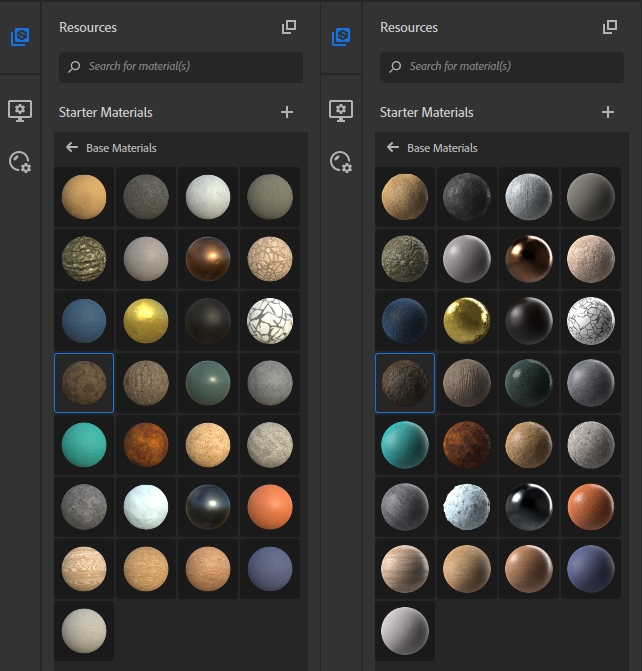
Older thumbnails (left), compared with new, improved thumbnails (right).
Second, you’ve probably seen that Substance Designer now allows generation of icons — and if that news passed you by, take a look at the video below. Well, this newest release of Substance Alchemist takes these icons into consideration; any icons generated in Substance Designer will now be displayed in Substance Alchemist. Welcome to an easier life.
Generating icons in Substance Designer
Scan the World in Chinese, Too!
Substance Alchemist, like Substance Painter, is now available completely in Chinese!
For detailed information on our progress with Substance Alchemist, you can find our full release note here:
https://magazine.substance3d.com/digitize-your-world-with-substance-alchemist/
And for those who aren’t feeling motivated to go outside to photograph the world, keep in mind that all materials here were generated from images taken from Adobe Stock, Adobe’s vast online library of images and assets!
Source:Adobe
熱門頭條新聞
- 3rd NVIDIA DGX Spark Hackathon · Agent Skills Development Challenge
- Mai Shiranui arrives! Crystal of Atlan Launches the Fighter’s new class branch, Sugariff Alongside The King of Fighters ’98 collaboration character
- Crossing the Anime Frontier: Steam Anime Game Festival 2026 Kicks Off, Bringing Together Worldwide Anime-Style Games
- GATE ZERO FIGHTS TO PROTECT HISTORY IN FIRST COMBAT GAMEPLAY TRAILER – COMING TO STEAM AND CONSOLES SPRING 2027
- 78th Emmy Awards (Formerly Creative Arts Emmy Awards) Concludes, Honoring On-and-Behind-the-Camera Talents in Television
- Mr. RECORDS Brings the Beat to Nintendo Switch 2
- Blossom: The Seed of Life Goes Co-op with the “Together on Mars” Updated
- SlashZero Debuts New Story Trailer at PlayStation State of Play, Demo Available Now on PlayStation 5 and Steam