Autodesk ships Arnold 6.0.4
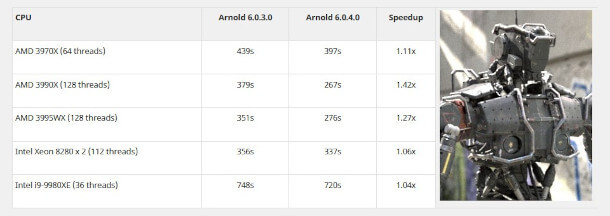
Arnold 6.0.4 improves render speed on highly multi-core modern CPUs like AMD’s new Threadripper Pros. The update also brings significant new features to the renderer’s 3ds Max and Cinema 4D plugins.
Autodesk has released Arnold 6.0.4, the latest version of the VFX-industry-standard production renderer, improving performance when rendering on highly multi-core modern CPUs.
The update also adds automatic file path remapping when working across multiple operating systems, a new rim light tint control for Arnold’s Toon shader, and extends GPU rendering and OSL and USD support.
The integration plugins also get some significant new features, with 3ds Max plugin MAXtoA getting Arnold RenderView, a new real-time render preview, plus initial support for the tyFlow physics toolset.
Cinema 4D plugin C4DtoA gets Arnold Scatter, a new render-time scattering system.
Faster rendering on modern highly multi-core CPUs
Although Autodesk has released updates to the renderer steadily since Arnold 6.0 shipped last year, Arnold 6.0.4 is arguably the most significant.
Changes in the core renderer include improved support for modern highly multi-core CPUs like AMD’s third-gen Ryzen Threadripper chips and Intel’s latest Core i9 and Xeon CPUs when rendering on Windows.
Autodesk says that the changes can cut render times “anywhere from a few percent to orders of magnitude”.
On AMD’s current top-of-the-range Threadripper Pro 3995WX, a “medium complexity” test scene rendered 1.27x faster than in previous releases; a “stress scene” with 8GB of textures rendered 237x faster.
Workflow improvements include automatic file path remapping, making it possible to modify file paths for individual operating systems: for example, when working in Windows, but rendering on Linux render nodes.
Updates to the Toon shader, GPU rendering, and better OSL and USD support
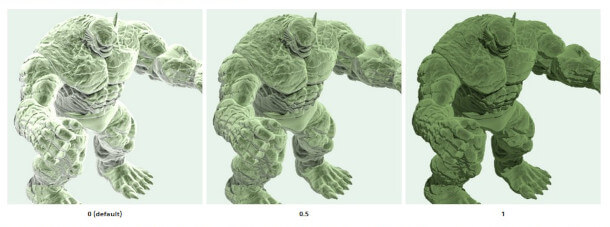
Updates to existing toolsets include a new tint control for the rim light in Arnold’s Toon shader, which tints the lighting with the base colour of the surface, modulating the intensity of the rim lighting effect.
New GPU renderer Arnold GPU now supports custom AOVs: functionality actually introduced in Arnold 6.0.3, but extended in 6.0.4 to support global AOV shaders.
The change makes it possible to add shaders to set specific AOVs without modifying the original shader tree.
Support for Open Shading Language has been extended, with Arnold 6.0.4 adding initial support for attributes, and for ray tracing in OSL shaders via the trace function.
The USD procedural introduced in Arnold 6.0 has been updated; and the Hydra render delegate, which enables Arnold to run as a viewport renderer in compatible software like Houdini, now supports USD curves.
MAXtoA: new Arnold RenderView real-time preview, plus initial support for tyFlow
Outside the core renderer, the DCC integration plugins have also been updated, with both 3ds Max plugin MAXtoA and Cinema 4D plugin C4DtoA getting significant new features on top of those in Arnold 6.0.4 itself.
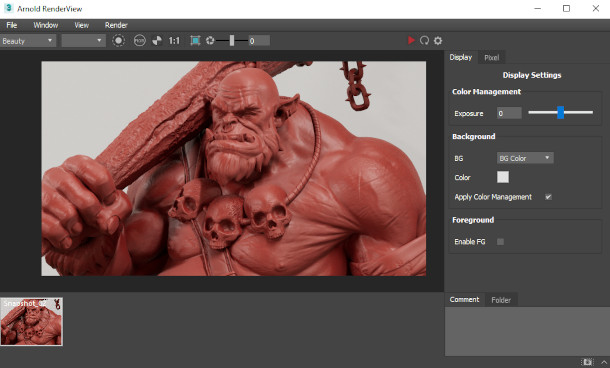
MAXtoA 4.1.0.71 introduces the Arnold RenderView window, which provides an interative real-time preview of changes being made to a scene during lighting or look development work.
Autodesk describes it as “solving several limitations of [3ds Max’s] native render view”, with the render updating while dragging the mouse, rather than on mouse release.
Users can also select cameras, AOVs and shading modes at any time, without re-exporting the scene.
Other features include the option to isolate objects, lights, materials and individual shader nodes to help debug shader trees, and “basic” colour correction.
MAXtoA also gets initial support for tyFlow, Tyson Ibele’s popular ‘next-gen rewrite’ of 3ds Max’s Particle Flow toolset, although it’s currently limited to tyFlow’s instancing operators.
C4DtoA: new Arnold Scatter scattering system
C4DtoA 3.1.0 adds Arnold Scatter, a new render-time scattering system.
The Arnold Scatter object enables users to distribute “millions of instances” over a surface, using parameters, vertex maps or any of Cinema 4D’s shaders to control the distribution pattern.
C4D’s Effectors can be used to animate the size and transformation of instances for motion design work.
The other plugins get smaller updates, with MtoA 4.0.4 for Maya and HtoA 5.4 for Houdini primarily adding support for the new features in the Arnold 6.0.4 core.
System requirements and availability
Arnold 6.0.4 is available for Windows 7+, RHEL/CentOS 6+ Linux and Mac OS X 10.11+. Integrations are available for 3ds Max, Cinema 4D, Houdini, Katana and Maya, and there is a legacy plugin for Softimage.
The software is rental-only, with single-user subscriptions starting at $45/month or $360/year. Multi-user subscriptions start at $630/year. The plugins are free.
Arnold GPU is supported on Windows and Linux only, and requires a compatible Nvidia GPU.
Read a full list of new features in Arnold 6.0.4 in the online documentation:
https://docs.arnoldrenderer.com/display/A5ARP/6.0.4.0
by Jim Thacker/Autodesk
熱門頭條新聞
- New AI, New Computing — The 7th AI Computing Conference (AICC2026) Grandly Opens in Beijing
- Germany’s Federal Game Development Funding Programme Allocates €267 Million Over Seven Years, Reshaping Domestic Gaming Industry Competitiveness
- PIF-Backed Merger Proposal Between EA and Savvy Games Could Reshape Global Gaming, With Far-Reaching Impacts on Both Parties’ Businesses
- Farming Camp Demo Expands to PS5, Xbox, Switch & Microsoft Store
- MIPJUNIOR 2026 to Open in Cannes: Full Introduction of Dates, Participation Channels, Core Sessions and Industry Significance
- Chill with You: SHIOI’s Sparkling Scenes – Steam Store Page Is Now Live
- SIGGRAPH Asia 2026 Takes Shape: Distinguished Keynote Speaker Line-up Unveiled
- Apple Completes App Store Leadership Transition; New Management Pursues Higher Margins, Phil Schiller Steps Back From Day-to-Day Operations